Start here · 4 of 5
Liquidation, and how to avoid it: a plain-English guide
What the liquidation price is, why leverage pulls it closer, how Strike closes a position in stages, and the habits that keep a first trade well clear of it.
Not affiliated with Strike. Not financial advice.
In one minute
- What it is: liquidation is the exchange closing your position because the money behind it can no longer cover the loss. You lose that margin.
- Who it's for: anyone using leverage, which on a perp is anyone who has not set it to 1x.
- The one thing to know: the liquidation price is shown before you confirm a trade. Lower leverage pushes it further away, and a stop order can close the trade before it is reached.
What liquidation is
Every leveraged position has margin behind it. A move against you eats into that margin. Strike requires a minimum to stay in the trade, the maintenance margin: a small percentage of the position's value, 0.4% on a Bitcoin position of up to $10,000. When your remaining margin falls to that line, the position is liquidated: closed by the exchange, not by you.
The liquidation price is the price at which that happens. Strike shows it as an estimate in the order panel before you trade, and next to each open position afterwards. The margin ratio is the same idea as a percentage: maintenance margin divided by what you have left, where 100% means liquidation.
Why leverage moves it closer
At 2x, the price has to fall about halfway before your margin is gone. At 10x, about a tenth. At 20x, a 5% move is enough. Leverage does not change how far prices move, only how far they can move before you are out.
How Strike liquidates
Strike does not dump the whole position at once. A solvent position is reduced in stages, up to five attempts on the public order book, each sized to the current risk. If a reduction restores the account, the rest stays open.
Only a bankrupt position, or one still unsafe after the final attempt, goes to the backstop. A protocol vault takes it on, and as a last resort Strike trims positions on the profitable side, which it calls auto-deleveraging.
Who it's for
- You are about to use leverage for the first time. The habits below are for you.
- You already hold a position. The liquidation price next to it says how much room it has.
- You copy a trader. Your copies use your leverage, so the liquidation prices are yours, not theirs.
How to check and move your liquidation price
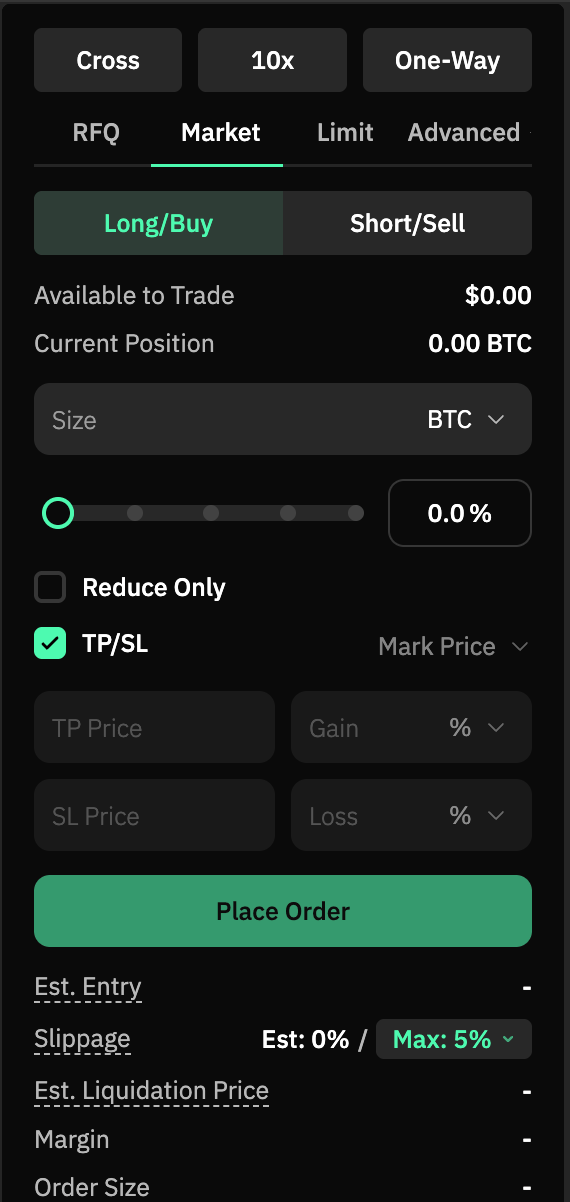
- On the Trade page, set your size and leverage. The panel's Est. Liquidation Price updates as you change them.
- Lower the leverage and watch the estimate move away from the current price. That is the simplest lever you have.
- Tick TP/SL to attach a stop-loss: a price at which Strike closes the position for you, before the liquidation price.
- After you trade, the Positions table shows each liquidation price. Under isolated margin you can add margin to push it further away.
A worked example
This is an example, not a suggestion. Take the $100 long on Bitcoin from the last guide, at 10x, so a $1,000 position. If Bitcoin falls about 9.6%, the $100 of margin is almost gone and the maintenance margin line is crossed. Strike starts closing the position around there.
Now take the same $100 at 2x, a $200 position. The price has to fall close to 50% before the same thing happens. Each 1% move is worth $2 instead of $10, and the trade survives an ordinary bad week.
Things worth knowing
- Liquidation is not free. On top of the lost margin, Strike can charge an adaptive liquidation fee when the forced close fills better than the bankruptcy price.
- Cross and isolated behave differently. Under cross margin your whole balance is the buffer, so the price is further away but the whole account is exposed. Under isolated only the locked margin is at risk.
- A stop order is not a guarantee. It becomes a market order when triggered, so in a fast market the fill can be worse than the stop price. It still acts long before the exchange has to.
- Copied positions can be liquidated too. If a lead you copy is liquidated, your copy closes by the same fraction. Your own copy can also be liquidated on its own, at your leverage.
Questions people ask
Will Strike warn me before liquidating?
The liquidation price is shown next to the position at all times, and the margin ratio rises as you get close. The closing itself is automatic.
Can I get the margin back after a liquidation?
No. The margin behind the position covers the loss, and any surplus from a better fill goes to the backstop under the liquidation fee rules.
Does a lower leverage setting cost anything?
No. It means a smaller position for the same margin, so smaller gains and losses per move, and a liquidation price further away.
What is the difference between a stop-loss and the liquidation price?
A stop-loss is a price you choose, where Strike closes the trade for you. The liquidation price is where the exchange must close it to cover the loss, so the first belongs well before the second.
How I use it
I only hold copied positions. Before any copy starts, I lock the leverage on every market the lead trades and cap how much of the account a copy can use. I check the liquidation prices after every new position, not only when the market turns.
Next
- Next: Your first trade on Strike (Start here, part 5, coming)
- Before this: Long, short and leverage
- Official docs: Liquidations and Margin Tiers
- Try it: open Strike (my referral link, 5% off fees)
Not financial advice.