Start here · 5 of 5
Your first trade on Strike: fund, buy, set a stop, close
A real $10 trade on Strike from start to finish: moving funds, placing a market order at 1x, attaching a stop-loss, and closing it, with every screen shown.
Not affiliated with Strike. Not financial advice.
In one minute
- What it is: a walkthrough of one small, real trade on Strike: a $10 long on Bitcoin at 1x, with a stop-loss, opened and closed within minutes.
- Who it's for: anyone who has read the first four guides and wants to see every screen before touching their own money.
- The one thing to know: the first trade is for learning the screens, not for making money. Keep it small, keep leverage at 1x, and set the stop before you place the order.
What a first trade looks like
Every trade on Strike runs through the same four screens: the account you trade from, the order panel, the position row, and the close dialog. This guide walks through them with a real order placed on 3 November 2026 on a fresh sub-account funded with $25.
A sub-account is a separate trading account under your main one, with its own balance. It is a tidy way to learn: the money at risk is exactly what you moved in. Strike creates one from the + button in the bottom bar.
| Step | What was done | What the screen showed |
|---|---|---|
| Fund | Transfer $25 from the main account | Account Value $25.00 |
| Set up | Isolated margin, 1x leverage | Shown at the top of the order panel |
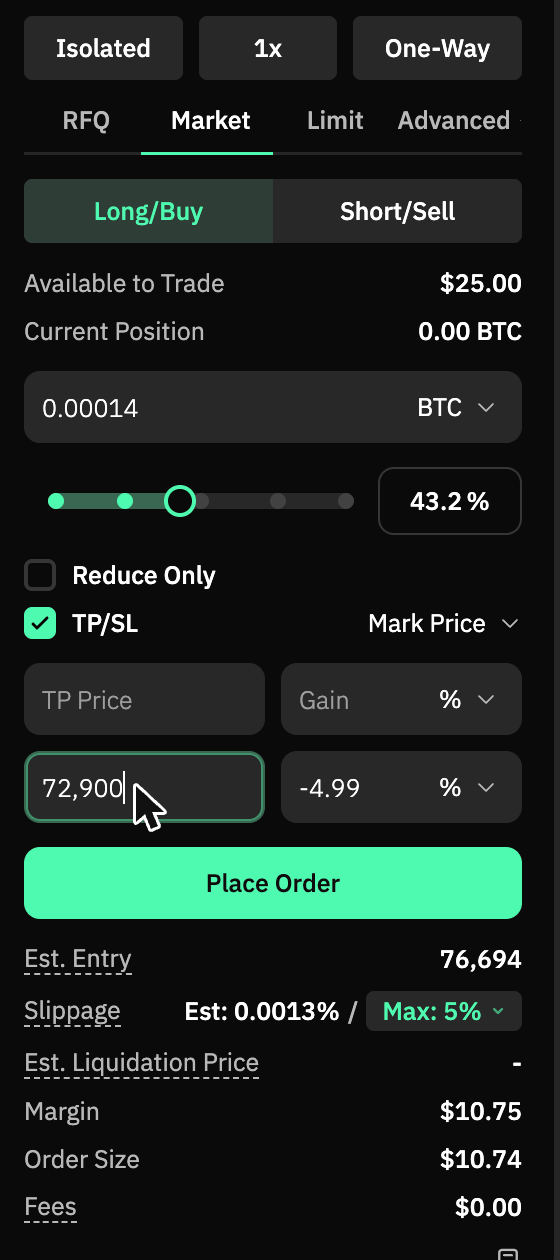
| Buy | Market order, 0.00014 BTC | Filled at $76,708, order size $10.74 |
| Protect | Stop-loss at 72,900 | About 5% below the entry |
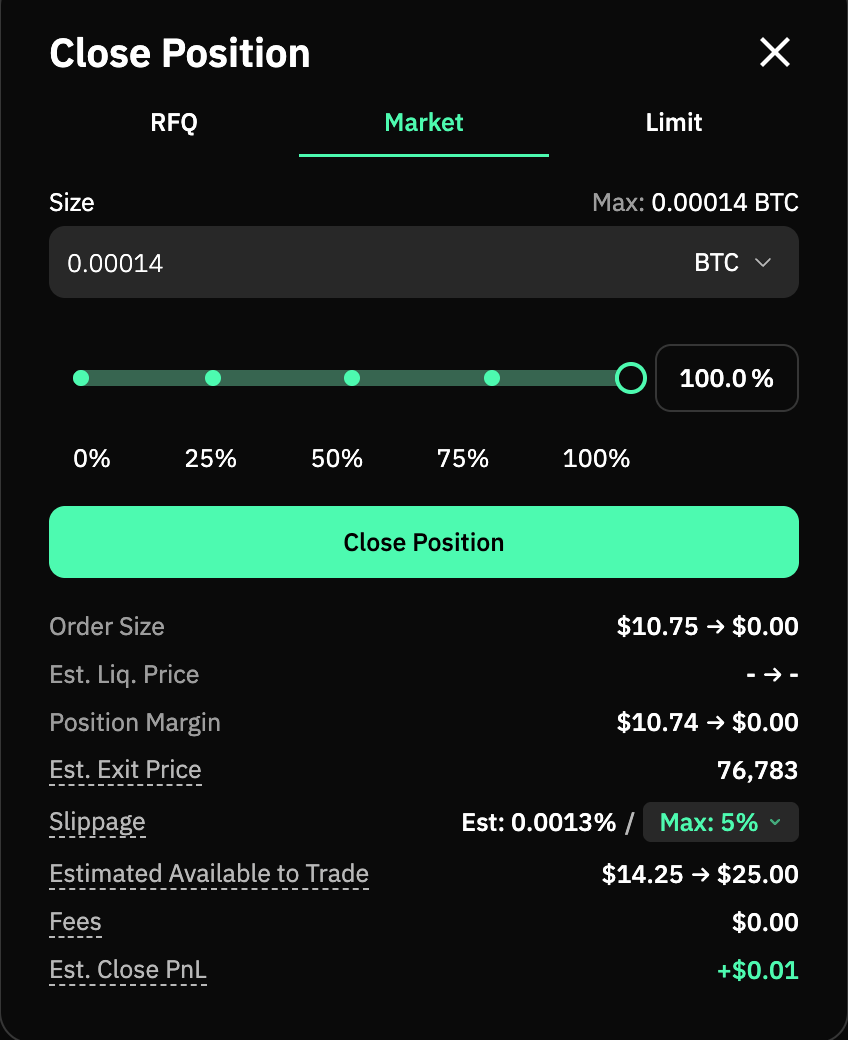
| Close | Close Position, 100% | Sold at $76,790, close PnL about $0.01 |
Who it's for
- You have never placed a perp order. Seeing the real dialogs removes most of the fear.
- You want to practise with a small amount. $25 in a sub-account and a $10 order is enough to learn every screen.
- You plan to copy a trader later. Knowing what a position row and a stop look like makes the copied positions legible.
How to place and close a first trade
- Fund the account. Deposit by card or crypto, or move money into a sub-account with Transfer. The Account Overview on the right shows what is available to trade.
- Set the margin mode and leverage at the top of the order panel: Isolated, then 1x. Guide 3 covers why.
- Enter the order. Market, Long/Buy, a size at or above the minimum. The panel shows the order size in dollars, the margin it will take and the estimated liquidation price.
- Tick TP/SL and type a stop-loss price a few percent below the entry. The panel shows the loss as a percentage next to it.
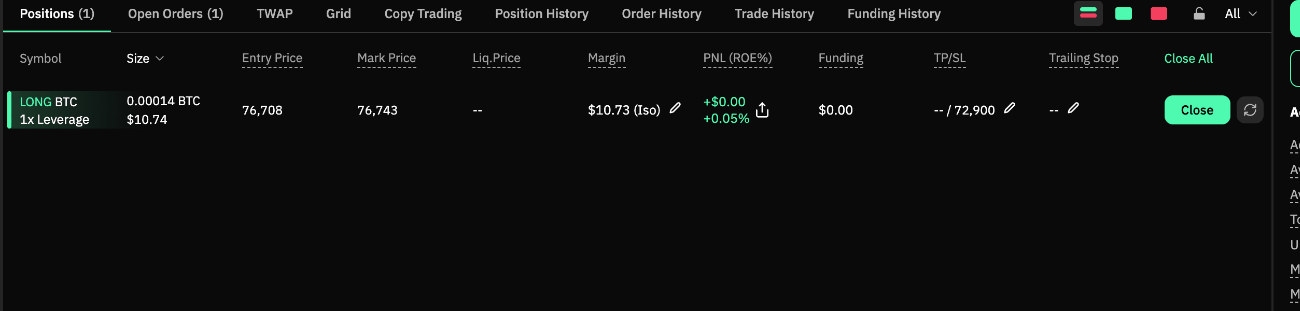
- Place Order. A confirmation names the fill price. The position appears in the Positions table with its entry price, margin and the stop.
- Close it with the Close button on the row. The dialog shows the estimated exit price and PnL; Close Position sells the whole position at market.
A worked example
This is the real trade, not a suggestion. The account held $25. The order bought 0.00014 BTC, worth $10.74 at the fill price of $76,708, with $10.74 of margin behind it at 1x. The stop at 72,900 sat 4.99% below the entry, so the most the stop could lose was about 54 cents.
Closing a few minutes later sold at $76,790, 82 dollars higher per Bitcoin, which on 0.00014 BTC came to about one cent. The trade history rounds that to $0.00, and the fee on each fill showed as $0.00 at this size. The point was never the cent: it was seeing every screen once with real money and no leverage.
Things worth knowing
- There is a minimum order size. The panel refused $9.20 and said so: the minimum was $10 on the day. Enter a little more than the minimum so rounding does not block the order.
- The stop-loss is tied to the position. Closing the position removed the stop with it; nothing was left in Open Orders.
- A market order fills at the going price. The fill came in a few dollars from the quoted mark price. For larger orders a limit order sets the price you are willing to pay.
- Sub-accounts keep risk separate. Nothing on the main account changed during the walkthrough.
Questions people ask
How much do I need to start?
Enough to cover the minimum order, $10 when this was checked, plus some room. $25 covered one trade comfortably.
Do I have to use a sub-account?
No. It keeps the learning money separate from anything else, and it is one click to create, so it is worth it.
What happens if the price hits my stop while I am away?
Strike closes the position at market once the mark price reaches the stop. You lose about the distance to the stop, not the whole margin.
Why was the fee shown as $0.00?
At this size the fee rounds to zero on screen. On bigger orders the base taker fee is 0.050% of the order's value.
How I use it
I do not trade by hand any more; copying is my whole method. But this walkthrough is exactly how I checked the platform the first time, and the sub-account created for it was emptied back to the main account the same day.
Next
- You have finished Start here. The feature guides follow: trading stocks and gold on Strike, copy trading, and Borrow and Earn.
- Back to the start: What is Strike?
- Official docs: Deposits and Withdrawals and Order Types
- Try it: open Strike (my referral link, 5% off fees)
Not financial advice.